How to access notification reports by status for all logins?
This article will provide you with information on how to access notification status reports for all login initiators (WhatsApp templates, bulk notifications, referred webchats, and referred ad campaigns).
Estimated reading time: 08 minutes
WhatsApp Templates
From the menu, navigate to Dashboards (menu > dashboards). Once there, go to Conversation Metrics. Select the period you wish to review to access the graph with information.
When accessing the notification report, you can view a graph differentiated by the state of these notifications: not sent, sent, read, delivered, and responded.
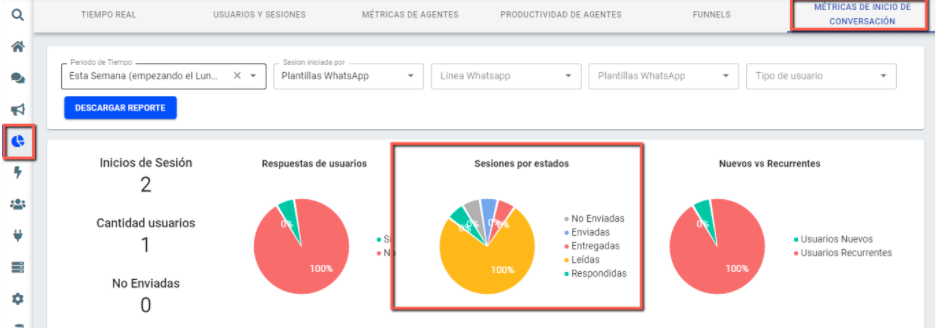
Some considerations regarding notifications:
- Not sent (failed): These are notifications that were not sent because the contact number was incorrect or because the template had errors in its parameters. You can refer to various errors in this article: Errors and Status Messages.
- Sent: The server received the message sent by your company.
- Read: These are notifications that were read because users activated read confirmation.
For more information on notifications, you can access the related documentation: Message Status Notifications.
Note: If you receive an error message from the platform such as "contact not found," it is because the user does not have a WhatsApp number or the number is not correctly loaded.
Bulk Notifications
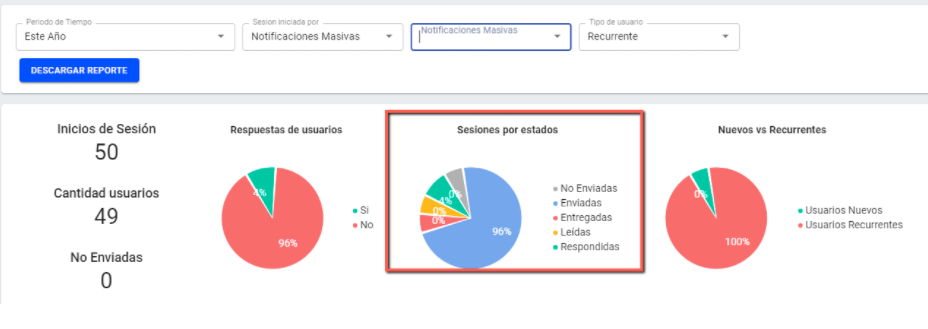
In this case, the status of notifications follows the same terms explained above for WhatsApp templates.
Referred Webchats
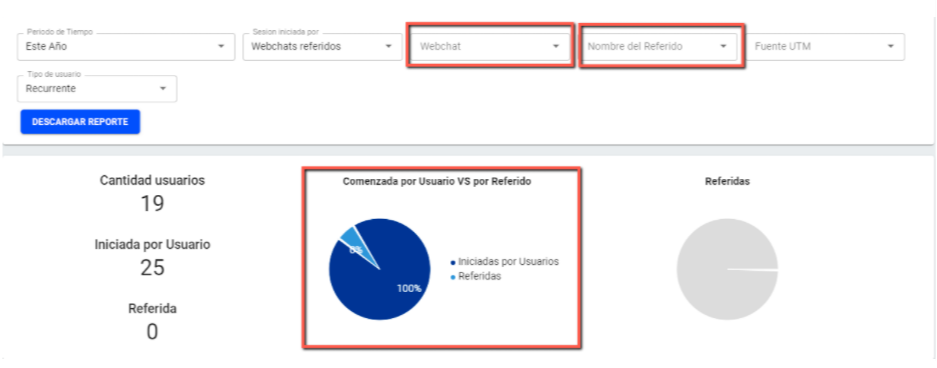
Regarding logins through referred webchats, the report will show conversations initiated by the user and those initiated by referred ads. Additionally, you can filter webchat initiations according to specified webchats and referral names.
To make your webchat display referred ads, add the attribute bm_ref=REFERRAL to the URL where the webchat is displayed. For example: www.mywebsite.com?bm_ref=test_referral.
You can also use UTM parameters to attribute chats to your marketing campaigns.
Referred Ad Campaigns
Reports on logins through referred campaigns show conversations initiated by the user and those initiated by referrals from specific campaigns through different contact channels (Ads in FB Messenger, click to FB Messenger, or click to WhatsApp). Additionally, you can filter the search by specific ads and by new/recurring users.
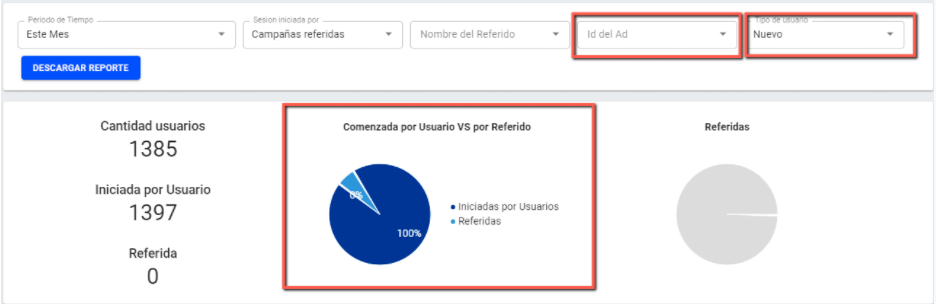
Finally, remember that you can download reports for all sessions initiated by WhatsApp templates, bulk notifications, referred webchats, and referred campaigns according to the filters you specify.

This way, you can analyze your conversational flows and continue improving your user support performance and marketing and communication strategies.
Visit our Help Center for more information.
Written By: Botmaker Team
Updated: 07/08/2024